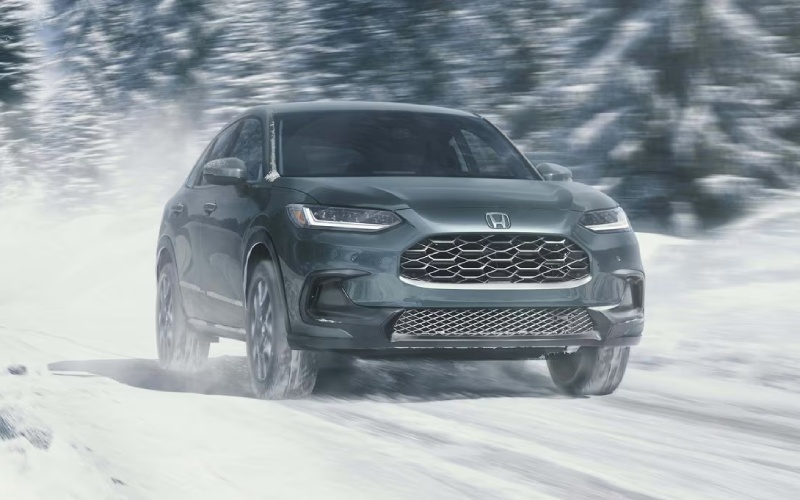
McGrath Honda Of St. Charles - Does the 2027 Honda HR-V support wireless CarPlay, Android Auto, and charging near Elgin, IL?
The 2027 Honda HR-V makes it refreshingly easy to leave the cords at home, and our answer is grounded in real ownership details you can use on day one. If you live, work, or commute around Elgin—whether you are hopping on I-90 at Randall Road, sliding into a space off Chicago Street downtown, or dropping kids at Elgin Community College—the HR-V’s built-in wireless tech helps you start every drive connected and clutter free.
Below, we explain exactly what “fully wireless” looks like in the 2027 HR-V, how to set it up, and what to expect throughout daily use. We also share a few pro tips from our delivery team at McGrath Honda of St. Charles, so you know how this technology behaves in the real world—like where to place your phone for the best charging performance and how the system handles multiple users in one vehicle.
What “fully wireless” means in the 2027 HR-V
Every 2027 HR-V includes a standard 9-inch Color Touchscreen, standard wireless Apple CarPlay® compatibility, standard wireless Android Auto™ compatibility, and a standard wireless phone charger. That combination delivers genuine cable-free convenience for navigation, calls, texts, podcasts, and charging—no adapters, no dangling cords, and no USB juggling when you switch drivers.
For many Elgin-area drivers, that matters most during short, frequent trips—pulling out of a townhouse garage in Bowes Creek, making a quick Target run off S Randall Road, or looping through the Big Timber station lot. The HR-V recognizes your paired phone automatically, brings your maps and media right to the touchscreen, and charges the device on the built-in wireless pad while you drive.
Why going wireless changes daily driving near Elgin
Cables often turn simple errands into small hassles—especially when you are parallel parking on Douglas Avenue or moving kids and backpacks in and out at parks along the Fox River. The HR-V’s standard wireless setup reduces the friction. Your navigation is already up, your playlists and podcasts resume where you left off, and your phone begins charging the moment it sits on the pad.
It also keeps the cabin tidy. The HR-V’s dashboard design features a refined, honeycomb-accented layout that looks and feels premium; staying wireless helps you keep that clean look without accessory clutter. And with Smart Entry with Walk Away Auto Lock® on select trims, you can step out with confidence—no extra reach for a cable before you head to the Gail Borden Public Library or a restaurant on Highland Avenue.
What you can do wirelessly in the HR-V
Here is a quick overview of key wireless capabilities you will use every day. Each item below reflects a built-in feature on the 2027 HR-V, not an aftermarket add-on.
- Navigation and maps: Use your preferred app through wireless Apple CarPlay® or wireless Android Auto™ on the 9-inch Color Touchscreen.
- Calls and messaging: Place calls and send or receive texts hands-free with voice control through CarPlay® or Android Auto™.
- Audio and podcasts: Stream music and podcasts from your phone, with an available 8-speaker audio system on EX-L.
- Device charging: Set your compatible smartphone on the standard wireless phone charger to top up while you drive.
- Google integration: Android Auto™ is now supercharged with Google Gemini™, adding even more helpful voice-driven assistance.
Because these features are integrated into the HR-V, you also benefit from the rest of the vehicle’s thoughtful technology—like the blind spot information system on Sport and EX-L, a rearview camera with dynamic guidelines, parking sensors on EX-L, and the Honda Sensing® suite that includes Collision Mitigation Braking System™ (CMBS™), Road Departure Mitigation System, Adaptive Cruise Control with Low-Speed Follow, Lane Keeping Assist System with Traffic Jam Assist, and Traffic Sign Recognition.
How to set up wireless CarPlay® and Android Auto™
Pairing takes a minute or two, and once you are set up, the HR-V will connect automatically the next time you get in with your phone.
- Enable Bluetooth and Wi-Fi on your smartphone before you enter the vehicle.
- Start the HR-V, then follow the on-screen prompts on the 9-inch Color Touchscreen to add a new device.
- Accept the pairing request on your phone and allow contacts and messages if you want hands-free calling and messaging.
- Confirm that wireless Apple CarPlay® or Android Auto™ is enabled on your phone. The interface will launch on the touchscreen.
- Place your phone on the wireless charger to top up as you drive—no cable required.
Our delivery specialists are happy to do this with you during your test drive or at delivery. We can also pair multiple phones and show you how the HR-V prioritizes the one you prefer when more than one paired device is in the vehicle.
Real-world charging tips from our team
Wireless charging performance depends on placement and your phone case. The HR-V’s charger is designed to be easy—set it down and go—but a few best practices help you get the most from it in daily Elgin driving.
- Center the phone on the pad: A centered position helps the charger maintain contact as you turn onto side streets or brake for lights along Summit Street.
- Use a slim, non-metal case: Thick or metal-backed cases can reduce charging efficiency. If your case is very thick, consider removing it before longer drives.
- Avoid stacking items: Do not place wallets, keys, or cards between your phone and the charger. Direct contact is best.
- Watch the charge indicator: The on-pad indicator or your phone’s notification confirms active charging—glance at it before you pull away.
If you prefer a cable as a backup for road trips, we will point out the cabin’s available USB ports during your visit. But for most local trips—from errands along Randall Road to commutes into Schaumburg—the wireless pad will keep you topped up without extra steps.
How the HR-V keeps you focused while connected
Staying connected should not come at the cost of confidence behind the wheel. The HR-V’s technology and safety systems complement its wireless connectivity, helping you keep eyes up and hands on the wheel even when the day gets busy.
- Voice-first controls: Use Siri® or Google Assistant through wireless CarPlay® or Android Auto™ to change destinations, place calls, and send texts without taking your hands off the wheel.
- 7-inch TFT Meter integration: View directions and key info right in front of you on the 7-inch TFT Meter to limit glances away from the road.
- Honda Sensing® support: CMBS™, ACC with Low-Speed Follow, LKAS with Traffic Jam Assist, and RDM help reduce fatigue during stop-and-go on I-90 or two-lane stretches on McLean Boulevard.
- Parking confidence: The rearview camera with dynamic guidelines is standard, and EX-L adds parking sensors to help when parallel parking downtown.
This thoughtful blend of driver-assistive tech and seamless phone integration means you can navigate, coordinate pickups, and manage your day more easily—without feeling tethered to your device.
Ownership considerations we hear from Elgin drivers
Customer questions often center on compatibility and how the system behaves when multiple people share the HR-V. Because wireless CarPlay®, Android Auto™, and the charger are standard, the experience is consistent across the lineup—great for households that rotate drivers or for carpool and campus runs.
Another consideration is how the HR-V’s cabin layout supports clean organization. The ergonomically placed controls, the 9-inch touchscreen with a volume knob, and available leather-trimmed seating on EX-L keep everything intuitive and upscale. Add the cargo practicality—24.4 cubic feet behind the 60/40 split 2nd-row seats—and you have a subcompact SUV that carries your gear without clutter, whether you are hauling groceries from Meijer or weekend supplies for a Fox River trail day.
How we help set you up at McGrath Honda of St. Charles
During your test drive, bring your primary phone—and a secondary device if another family member will regularly drive the HR-V. Our team will:
- Pair multiple devices: We can add phones for everyone in the household and show you how connection priority works.
- Customize your screens: We will help you arrange your favorite apps on the 9-inch Color Touchscreen for quick access.
- Tune audio settings: If you choose EX-L, we will help you fine tune the 8-speaker system for music or podcast clarity.
- Walk through safety tech: We will review Honda Sensing® settings so your driver-assistive features are dialed in to your preference.
If you ever need a refresh, our Service Department is open extended hours, and we can re-pair or troubleshoot phones during an Express Service visit—perfect if you are squeezing in maintenance before heading back up Randall Road to Elgin.
Frequently Asked Questions:
Is wireless Apple CarPlay® and Android Auto™ really standard on every 2027 HR-V?
Yes. The 2027 HR-V includes standard wireless Apple CarPlay® compatibility, standard wireless Android Auto™ compatibility, and a standard 9-inch Color Touchscreen across the lineup.
Do I need a cable for charging if my phone supports Qi wireless charging?
No. The HR-V’s standard wireless phone charger creates a hassle-free charging zone for compatible smartphones. You can still keep a cable as a backup if you prefer, but most daily drives around Elgin will be fully cable free.
Will my Android phone work if I do not use Google services?
Wireless Android Auto™ supports a broad range of compatible Android™ phones. If you choose not to use certain services, you can still connect and use core features like calls and media through Android Auto™.
What happens if two paired phones are in the HR-V at once?
The system connects to the last active device by default. You can quickly switch devices on the touchscreen if another driver or passenger wants to take over navigation or audio.
Does wireless CarPlay® or Android Auto™ use my phone’s data plan?
Yes. Navigation, streaming audio, and messaging rely on your smartphone’s data connection. If you download music or maps for offline use, you can reduce data usage on longer trips.
Take the next step with us
If you are shopping near Elgin, IL and want a small SUV that truly goes wireless without compromise, the 2027 Honda HR-V delivers. Bring your phone to McGrath Honda of St. Charles, and we will pair it, walk you through wireless Apple CarPlay® and Android Auto™, demonstrate the wireless charger, and tailor the settings to your daily routes. While you are here, you can also explore confidence-boosting tech like the blind spot information system on Sport and EX-L, parking sensors on EX-L, and the full Honda Sensing® suite that comes on every HR-V.
Visit us at our St. Charles showroom for a hands-on demo and a test drive that starts the way your mornings do—wireless, organized, and ready to go.